Work. Personal. Side by side.
SessionFlip gives each of your Claude and ChatGPT accounts its own window on your Mac, all open at once. Never sign out again.
macOS 14 or later · 7 days free · no account needed
Stop signing out.
One Mac, two accounts, and a morning spent signing in and out. With SessionFlip every row reads Open, all day.
How it works
-
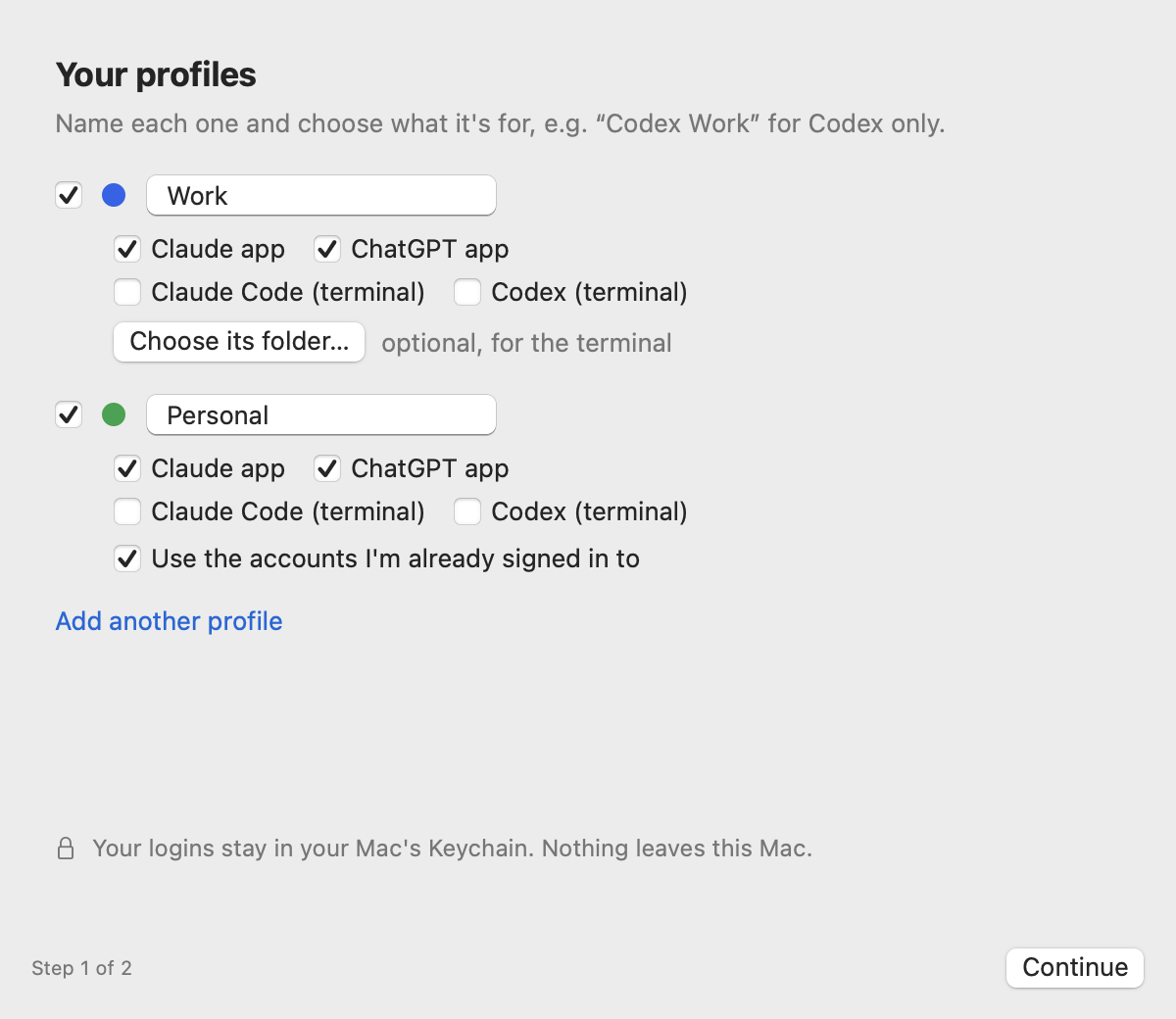
Make a profile
Name it and give it a colour: Work, Personal, a client. Setup takes two steps, and it can start from the accounts you're already signed in to.
-
Open its Claude
Click “Claude — Work” in the menu and a Claude window opens with that account's own login, chats, settings and MCP servers. “Claude — Personal” opens beside it. Both stay signed in.
Illustration: two Claude windows, two accounts, open together. Each keeps its own chats. -
Open its ChatGPT
The same for the ChatGPT app: one window per profile, each with its own login. Sign in once in each window; after that it just opens.
SessionFlip runs the real apps, unmodified. Each profile gets its own data folder, so logins and chats never mix.
A menu and three tabs.
SessionFlip lives in your menu bar, with no Dock icon and nothing to look after. Settings has three tabs: Profiles, Terminal and Advanced.

In the terminal too, if you want it.
claude and codex pick the right account from the folder you're in. It's optional: turn it on in Settings → Terminal, and turning it off puts your shell files back byte for byte.
- ~/Work/api
- Work, from the folder rule ~/Work
- ~/Personal/blog
- Personal, from the folder rule ~/Personal
- ~/Code/client-site
- Work, from a
.sessionflipfile in the project - ~/Downloads
- Personal, the terminal default
Which profile applies
- The most specific folder rule.
~/Work→ Work covers everything inside it. - A
.sessionflipfile in the project, holding just a profile name, when it sits deeper than the matching rule: a Work repo inside a Personal~/Codefolder. Commit it to the repo if you like. - Otherwise, your terminal default, picked from the menu.
Works in Terminal, iTerm2, Ghostty, Warp, and the VS Code and Cursor terminals.
Signal-box rules
-
Local only
No server, no analytics, no account with us. Only update checks and your licence touch the network: activating it, a check-in every 14 days, and deactivating it.
-
Never holds your logins
Each app keeps its own login in your Mac's Keychain. SessionFlip never reads, stores or shows a password or token.
-
Never for dodging limits
Profiles keep separate accounts apart. There's no “switch when one runs out”, and there never will be.
-
Real apps, untouched
Claude, ChatGPT,
claudeandcodexstay exactly as they are. SessionFlip only chooses how they start. -
Fully reversible
Remove Everything deletes all SessionFlip data and puts your shell files back byte for byte.
One ticket. £3.99.
7 days free trial
Everything unlocked. No card, no account.
No. 000004
This Mac to any profile
£3.99 one-time licence
Or $4.99 / €4.99. Polar charges you in your own currency.
- Up to 3 Macs
- Works offline
- Updates included
No. 000004
Downloads open soon. The free trial and the £3.99 licence go live here first.
When the trial ends, your terminal keeps working exactly as you set it up. Only creating and changing profiles, signing in and opening profile windows need a licence.
Questions
Does it work with my existing accounts?
Yes. An “existing setup” profile uses the Claude, ChatGPT and terminal logins you already have, unchanged. Other profiles each sign in once, in their own window.
Why do all my Claude windows have the same Dock icon?
macOS shows the icon of the app that's actually running, and that's always the real Claude app, which SessionFlip never modifies. The SessionFlip menu shows which profiles are open, and clicking one brings that exact window forward.
“Continue with Google” does nothing in a profile's Claude window?
Use Sign in with Google next to the profile in SessionFlip's Settings, then click “Continue with Google” in that window within 5 minutes. With several Claude windows open, macOS can otherwise send Google's reply to the wrong window; for those few minutes SessionFlip makes sure it reaches the right one. Email sign-in always works too.
Does it help me get around usage limits?
No, and it never will. Profiles keep separate accounts apart, such as work and personal. There's no “switch when one runs out” feature.
What does it send over the internet?
Update checks, and your licence key with this Mac's name when you activate, check in (every 14 days) or deactivate. Nothing else: no analytics, no telemetry, no account.
What happens when the trial ends?
Your terminal keeps working with the same profiles and folder rules. Creating or changing profiles, signing in and opening profile windows ask for a licence: £3.99 ($4.99 / €4.99), once, for up to 3 Macs, and it works offline.
Does each profile use extra disk space?
A little. The exception is Claude's built-in virtual machine, used by Cowork and some features: it's stored per profile, so expect several gigabytes in any profile that uses it.
How do I remove it completely?
Settings → Advanced → Remove Everything SessionFlip Added, then move the app to the Trash. Your shell files go back exactly as they were, and your normal Claude, ChatGPT, ~/.claude and ~/.codex are never touched.
Why isn't it on the Mac App Store?
The App Store's sandbox doesn't allow opening an app with its own profile folder, or adding the terminal commands. That's the whole point of the app.
Never sign out again.
macOS 14 or later · 7 days free · then £3.99 once